Sharing of published content is exploding. How do you turn all those bursts of social traffic into readers and subscribers?
Our recent posts on how to convert followers to subscribers (parts one and two) got a great reception on Twitter and coverage from the American Press Institute. They’re information rich – and they’re long.
So we decided to distill all that down to a single blog post with a summary of all you need to know.
The idea behind this post is that publishers everywhere are experiencing growth in traffic from social. However, this traffic can be fleeting in nature – readers click on a link on their timeline, read the story, and then disappear into the night.
Based on our data and interviews with leaders in social news distribution, we’ve put together a logical five step guide to both attracting a social audience and converting them into subscribers – via a Twitter follow, a Facebook “like”, or some other connection.
1. Think of Facebook and Twitter as your alternative front page
So picture this: A new reader from a social network is about to stumble onto one of your stories on Facebook or Twitter, after one of his or her friends shared a link. This is your first impression. Make it count.
Content will appear differently formatted on each platform, and each has different timing, dynamics, and audiences.
A) Facebook
Format
Pay attention to the image, headline and summary that appear in the preview before posting to your page. Facebook advises that “shorter, succinct posts are better received” – though our own research (and the prevalence of longer headlines from some viral news sites) makes us think this is not absolutely necessary.
Images
Your pictures should be at least 1,200 x 630 pixels in order to generate a big, eye-catching preview. Any image under 600 x 315 pixels will lead to your preview being demoted to a smaller thumbnail.
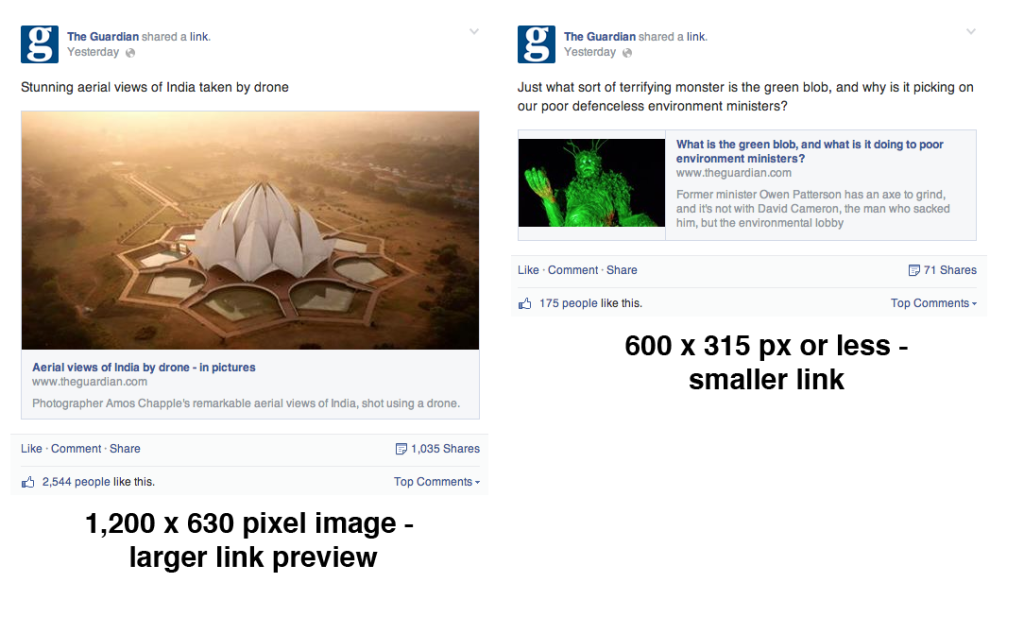
Facebook has adjusted images’ aspect rations, so they are the same for mobile and desktop. The ideal? As close to 1.91:1 as possible.
Video
Make use of the autoplay feature in videos uploaded directly to Facebook. There is evidence to suggest that these can attract more social interactions than YouTube links.
Facebook recommends that when uploading videos, clips should have an aspect ratio no larger than 1,280 px wide, divisible by 16 px.
Timing and Audience
If you have a Facebook page with over 50 likes, you can get some data on when that time might be, and what segments of your subscribers to target. You can find the Insights tab at the top of your page.

Insights shows you where your Facebook fans are based, and crucially, when the majority of them are online. You can also schedule posts using the calendar icon.
B) Twitter
Framing content to impress a new subscriber from Twitter involves a little more strategizing.
- Add a Gif to your article – Use free online tools gifninja and LiceCap.
- Cards – Experiment with adding a card – an image with some data or quote – to your article tweet. Go ahead and hog some space in the news stream.
- Headlines – Users on different platforms tend to gravitate toward different categories of content, you might have to characterise a story differently to bring readers from Twitter.
- Images – PNG and JPEG images of up to 5MB can be posted to Twitter, and will be previewed in user’s timelines, increasing your visibility if you are retweeted. Use strong images, ideally at 440 x 220 px. Check what your tweets look like on mobile and desktop.
If your story doesn’t have the the reaction you were hoping for, wait a while, then repost, using a different angle. Pull out the IAE – Interesting Atomic Elements – of your story: quotes, facts and statistics.
2. Optimize for sharing: The share buttons debate and mobile audiences
Once people land through on your page and read the story or watch the video, you have two goals – to encourage them to share, and to convince them to become a regular subscriber.
A) Social Sharing Buttons
If you want readers to share your content, make it easy for them. Here’s two things to keep in mind when it comes to deciding on how to use share buttons:
Size: You’ll have to work your button designs into the layout of your site, but from looking at some of the most successful social leaders, bigger is better.
One popular trend involves simplifying sharing options to just the main networks, and providing direct instructions, at the bottom of each post. If you’re going down this route, put in some robust, clickable buttons.

Placement: Where you put your share buttons is another debate – above, below, or on the side?
One solution is to install a heat map, which tracks visitors’ scrolling behaviour, to review where might be the most effective place to insert the buttons on your page.
Make the “Nuggets” of a Story Shareable: In the same vein, consider making parts of the story shareable – by pulling out different facts, quotes, or other talking points, you’re opening up new sharing potential in the story.
The L.A Time design overhaul offered readers ‘sharelines’ or different pre-written tweets of article talking points to share.
B) If it doesn’t work on mobile, it doesn’t work.
Having a mobile preview built in to your Content Management System solves many of the problems of mobile compatibility before they even become an issue, forcing writers and editors to rethink the open-plan designs they had in mind for desktop. News consumption is going mobile – and so is news sharing. Keep the buttons prominent.
Sharing buttons can be neglected because mobile users may use the browser-based share functions to share directly, bypassing whatever is hosted on your site.
What do you do with the new subscribers you earn from getting your stories shared, and how to get them to become broadcasters for your content?
3. Make new visitors stick around: Loading fast, looking good and serving related content.
A) Loading fast
Simple steps to take to improve page load times include:
- Ensure your site has no broken links or unnecessary tags,
- Optimise your images for the web by using JPEGs – never PNGs,
- Checking your load times regularly.
B) Make a visual impact
Having things look well is an obvious factor in getting people to enjoy reading and, eventually, sharing from your site.
Sites that have been designed as visual content trails include TIME, the LA Times, Quartz and NBC News – we’ve recorded all of these sites performing strongly each month on social networks.
C) Suggest other relevant stories
Your homepage is probably no longer the front door to your content. More and more visitors are landing on your stories via the ‘side-door’ of sharing.
Content suggestion can work in two main ways. It can suggest the main stories of the day, stories related to the original, or, of course, there’s OutBrain and other content recommendation systems that claim to learn a reader’s preferences.

4. Turn readers into subscribers: Getting readers to like and follow.
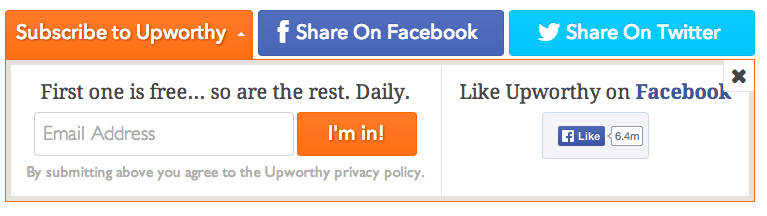
The internet is a distracting place, and even those with the best of intentions will soon forget you ever existed so now is your chance to to remind your new readers to subscribe to your page.
Push readers into linking your Facebook page or following you on Twitter hard. These new subscribers will become broadcasters for your stories in the future. As long as you keep them interested.
5. Keep them coming back, and stay informed: The long game.
Now you’ve won your new subscriber, your next challenge is to get them to share your content so you can reach their friends and followers, starting step 1 all over again.
A) Figure out how often to post.
Optimum posting frequency varies depending on your output, but bear in mind that neglecting to post means that the EdgeRank algorithm’s freshness detector might reduce your reach when you post again.
According to recent Facebook guidelines, you should avoid asking readers to ‘like, comment, or share’, and cliched calls to action when posting your links.
On Twitter, linking out up to 30 times or more a day can work fine, provided you’re still seeing engagements.
B) Frame your stories for maximum reaction.
If you’re publishing a lot of content daily, cherry-pick the stories that will have resonance online, and put effort into framing them with their emotional heart facing out.

C) Listen to your readers.
Once you post stories to your page, don’t ignore your readers. Comments act as a way of letting friends-of-fans see your post, so encouraging discussion by including calls to action, asking questions or running occasional competitions will pay off.

D) Watch how others are doing it.
For sites posting news to Facebook and Twitter, it doesn’t hurt to keep an eye on how others are framing a story for major social impact.
At USA Today, news editor Holly Moore says her team use social media tools (like our own Spike) to educate their newsroom, allowing them to better understand how to make sure their stories have maximum impact on Facebook and Twitter.
“What are they pulling out of a story that we’re not? Did we lead with our guns? We’d like to see USA Today on top more whenever possible.”
That’s the long game – and it’s worth playing, given the ongoing movement to social network distribution of content. And of course we should add that you should actually work on creating content worth sharing.
For more on how USA Today discover the best content, signup for a Spike trial today – it only takes a minute and no credit card is required.